Migrating files from Dropbox to pCloud has never been easier. With RiceDrive, you can transfer your files directly between cloud storage accounts without downloading them to your computer. This guide will show you how to move Dropbox files to pCloud for free in 2025, step by step.
Step 1: Sign Up and Log In to RiceDrive
- Go to the RiceDrive website.
- If you don’t have an account yet, click Sign In to register for free.
- Log in to access your RiceDrive dashboard.
Tip: RiceDrive offers a free transfer quota, usually 10GB, perfect for testing the migration process before upgrading to a paid plan.

Step 2: Connect Your Dropbox Account
- On the dashboard, click Link Drive.
- Select Dropbox and log in to authorize RiceDrive to access your files.
- Once authorized, your Dropbox folders will appear in RiceDrive.
Note: RiceDrive only reads the files you authorize. Your original Dropbox files remain unchanged.

Step 3: Connect Your pCloud Account
- click Link Drive again.
- Select pCloud and log in to authorize access.
- Your pCloud folder structure will now be visible in RiceDrive.
Note: Please click the "Allow" button on the left, not the "Deny" when authorizing.

Step 4: Create a Transfer Task
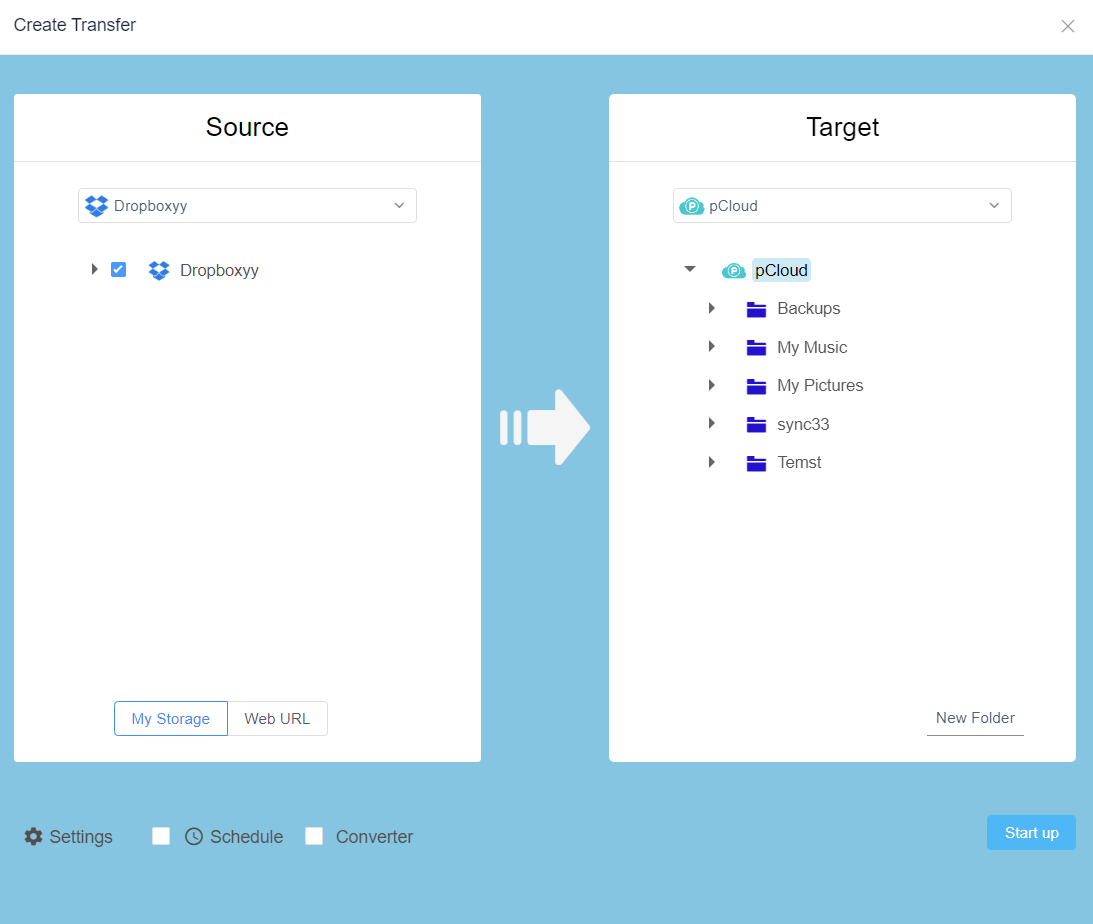
- Click Cloud Transfer or Create Transfer Task.
- Choose Dropbox as the source cloud and pCloud as the destination cloud.
- Select the files or folders you want to migrate.
- Click Start up to begin.
Tip: For large files or multiple folders, use RiceDrive’s batch transfer feature for efficiency.
Step 5: Monitor Your Transfer
- Go to Completed Transfer on the dashboard.
- Check the status of your migration, including completion time and transferred files.
- Verify that your files are correctly uploaded to pCloud.

Why Use RiceDrive?
- No local downloads needed – saves time and bandwidth.
- Secure authorization – your Dropbox and pCloud accounts are protected.
- Resumable transfers – network interruptions won’t disrupt the process.
- Free transfer quota – test the service before committing to a paid plan.
- Large file support – transfer files of any size, even tens or hundreds of gigabytes, without interruptions.
- Bulk file migration – move thousands or even millions of files in a single task, perfect for large-scale cloud data migration.
Conclusion
Moving Dropbox files to pCloud in 2025 is simple and free with RiceDrive. Whether transferring a few files or entire folders, RiceDrive handles the process securely and efficiently, making cloud-to-cloud migration easier than ever.
👉 Try it now at www.ricedrive.com and take full control of your cloud files!
